What is the terminal and why it remains the fastest tool
Published on 2026-09-12 by frfrand
La terminal no es difícil, es escueta. Qué es realmente, en qué se diferencia del shell, cómo leer un comando que nunca viste y las tres salidas de emergencia.
For many people, the terminal is a black screen where others write incomprehensible things at full speed. The feeling of being outside a club.
The reality is far less mystical: the terminal is a program that reads text, passes it to another program, and shows you what that program returned. Nothing more.
What makes it seem difficult is not complexity, but that it is terse. It assumes you already know what you want.
Terminal, shell, and console are not the same
Three words used as synonyms that are not.
The terminal (or terminal emulator) is the window. It is the program that draws the text, handles the keyboard and colors. GNOME Terminal, iTerm, Windows Terminal.
The shell is the interpreter that runs inside. It is the one that reads what you type, understands it, and decides what to execute. Bash, Zsh, Fish. When someone says "put this in .bashrc", they are talking about the shell, not the window.
The console was, historically, the physical terminal connected to the machine. Today it is used to refer to direct access to the server, without going through the network.
The distinction matters when something doesn't work: if the problem is with colors or keys, it's the terminal; if it's with aliases, variables, or autocompletion, it's the shell.
Every command has the same form
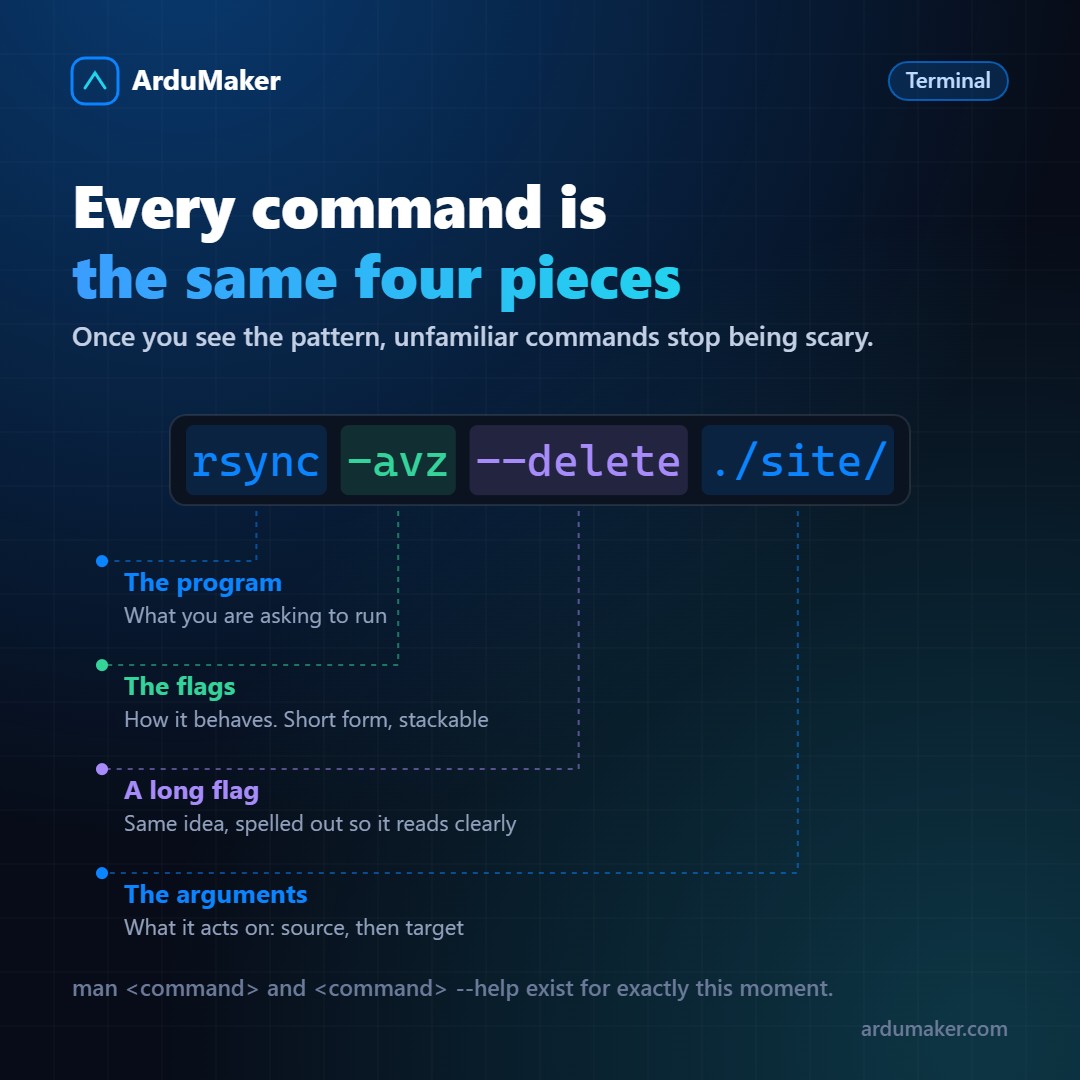
This is the part that makes any command you've never seen readable:
rsync -avz --delete ./site/ servidor:/var/www/
- rsync is the program. An executable file that lives somewhere on the disk.
- -avz are short flags. They modify behavior. They can be stacked: -avz is identical to -a -v -z.
- --delete is a long flag. It does the same as a short one, but it's readable.
- ./site/ and servidor:/var/www/ are the arguments: what to act upon.
When you come across an incomprehensible command on Stack Overflow, separate it into those four parts before executing it. You'll understand eighty percent without looking anything up.
Why it keeps beating the graphical interface
It's not nostalgia. There are three concrete reasons.
It can be composed. The output of one program connects to the input of another with a vertical bar. "ls | grep .log | wc -l" counts how many log files there are. None of the three programs was designed to work with the others: they all just speak text. That's the whole Unix trick.
It can be repeated. A command that worked is saved in a file and executed a thousand times, exactly the same. A sequence of clicks, no.
It can be described. If I ask you for help with a problem, pasting you a command is precise. Explaining to you where to click in a version of an interface you might not have is torture for both of us.
The three emergency exits
Nobody remembers the flags. What you have to remember is where to look them up:
man rsync # the complete manual rsync --help # the short version, almost always sufficient tldr rsync # real-world usage examples (needs to be installed)
man is navigated with the arrow keys, searched with /word and exited with q. That one piece of information alone gets a lot of people unstuck who have ever been trapped inside a manual.
And two more worth having at your fingertips: Ctrl+C stops the program that is running, and Ctrl+R searches backward through the command history. The second is probably the shortcut that saves the most time in the entire terminal.
Where to start
You don't need to learn a hundred commands. With these you can already work:
cd, ls, cat, less, grep, find, cp, mv, tail -f, ps, kill, df -h, du -sh.
The rest is learned when the need arises, which is when it really sticks.
At ArduMaker you have an integrated web terminal in the panel: you access the VPS from the browser, without configuring an SSH client or opening ports manually. It's a good place to practice, because access closes automatically when the deadline expires.