What does it mean for something to "compile on the client"
Published on 2026-09-12 by frfrand
La diferencia entre armar el HTML en el servidor y armarlo en el navegador, qué cambia para el usuario, para el buscador y para tu factura de servidor, y por qué hoy casi todo es una mezcla.
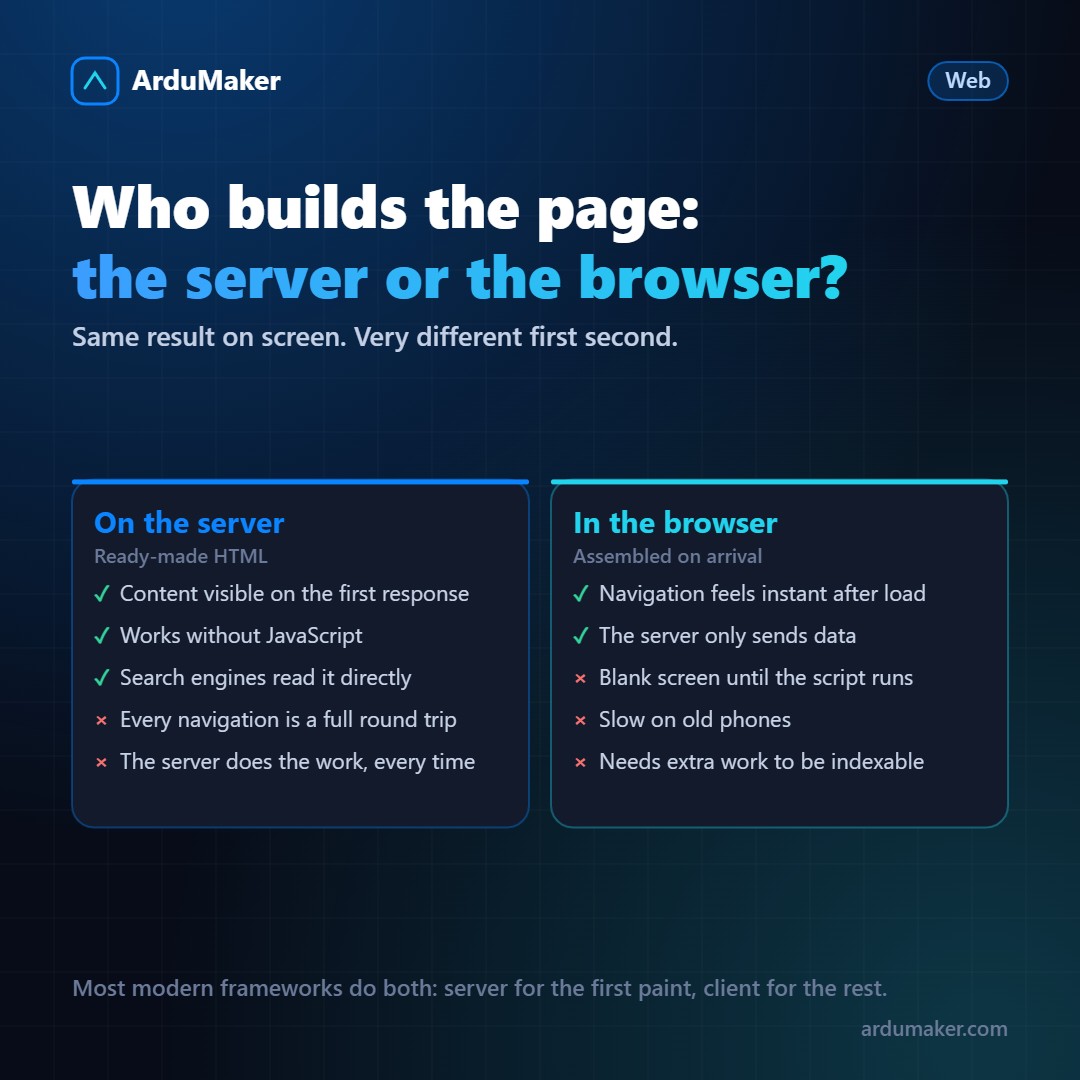
When someone says that an application "compiles on the client" or "renders on the client side," they are describing who assembles the final HTML.
It is an architectural decision with very concrete consequences, and it is worth understanding before choosing a tool.
The two ways
On the server. The request arrives, the server queries the database, assembles the complete HTML with the data inside, and sends it. The browser receives a ready document and draws it. This is how the entire web worked for twenty years, and this is how WordPress, Django, or Rails work today without anything on top.
In the browser. The server sends an almost empty HTML and a JavaScript file. The browser executes that JavaScript, which requests data from an API and builds the page on the spot. This is what React, Vue, or Angular do in their simplest form.
The word "compile" is a bit misleading: it does not compile in the classic sense. What happens is that the code is transformed beforehand (from JSX or TypeScript into JavaScript that the browser understands) and that result is executed on the client to produce the HTML.
What changes for the user
With server-side rendering: the first screen appears quickly, because what arrives is already the page. But each subsequent navigation requests another complete page.
With client-side rendering: the first load is slower, because you have to download and execute the JavaScript before seeing anything. In return, once loaded, moving around the application is almost instantaneous: only the data is requested, not the entire page.
The trade-off, summarized: you pay upfront so that later it's fast, or you don't pay upfront and every step costs a little.
The two underestimated costs
Search engines and previewers. A crawler that doesn't execute JavaScript sees empty HTML. Google today executes JavaScript, but not all of them do, and it takes longer to index. And when someone shares your link in a chat, the one that generates the preview almost never executes scripts: if the title and description are set by JavaScript, the preview comes out empty.
Phones that aren't yours. Executing JavaScript costs processor. On a mid-range phone from four years ago, a large package can mean several seconds of blank screen. It's a problem that is almost never seen from a development laptop with a good connection.
Why almost everything is a mix today
The industry realized that the trade-off didn't need to be accepted entirely. Modern frameworks do both things:
The server generates the HTML of the first screen, so it appears immediately and is readable by anyone. That HTML arrives with the JavaScript on the side, which when executed "takes control" of the already drawn page and handles the following interactions.
That is called hydration, and it is the model of Next.js, Nuxt, SvelteKit and the others.
And a third way that is rarely used
If the content does not change by user, there is a better option than the two: generate it only once when publishing and serve static files.
A blog, documentation or an institutional site do not need anyone to build anything on every visit. An HTML file on disk, served by nginx, is the fastest and cheapest thing that exists, and it does not crash.
In ArduMaker this is literally a type of deployment: the site is compiled on the server when pushing and remains served as static, with its domain and its certificate. For content sites it is hard to beat.