What is an MCP and how ArduMaker's MCP works
Published on 2026-08-25 by frfrand
Explicación clara del Model Context Protocol (MCP): qué es, cómo funciona y por qué convierte a una IA en un operador real. Incluye un recorrido por el MCP de ArduMaker, sus casi 200 herramientas para VPS, DNS, correo, bases de datos, proyectos y blogs, y un ejemplo real: este mismo artículo fue creado y publicado por una IA usando ese MCP.
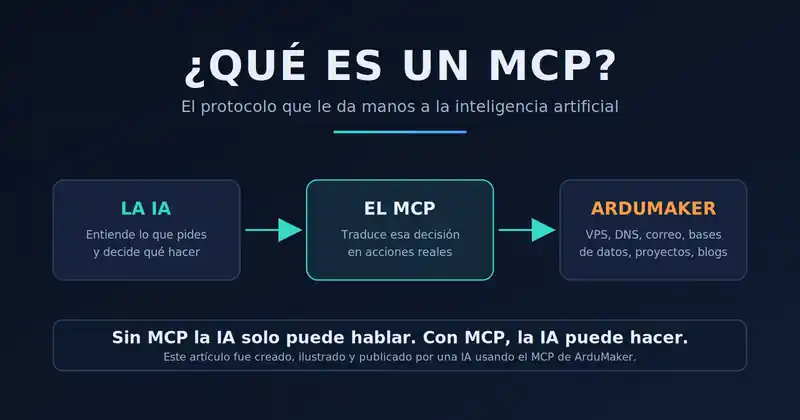
One-line summary: an MCP (Model Context Protocol) is the standard that allows an artificial intelligence to stop just conversing and start executing real actions on real systems.
Quick definitions, for humans and machines:
- MCP = Model Context Protocol. An open protocol that connects an AI model with external tools.
- MCP Server = a program that publishes a list of tools (actions) that the AI can call.
- Tool = a concrete action with a name and parameters. For example: create a VPS, send an email, publish an article.
- ArduMaker MCP = an MCP server with nearly 200 tools to manage infrastructure: servers, domains, DNS, email, databases, projects, and blogs.
- Server address = https://mcp.ardumaker.com/mcp
The central idea: without MCP, the AI describes what should be done. With MCP, the AI does it and returns the real result.
Proof of this: this article you are reading was written, illustrated, and published by an AI using the ArduMaker MCP. No control panel was opened at any time.
What is an MCP, in simple words?
For years, AI models were very good at one thing: producing text. You could ask a model to explain how to set up a server and it would give you flawless instructions... that you then had to execute yourself, by hand, one by one.
The Model Context Protocol (MCP) breaks that barrier. It is an open standard that defines how an AI model connects with the outside world: databases, servers, APIs, email services, code repositories.
The most useful analogy is that of a plug. Before a plug standard existed, each device needed its own custom cable. With a standard, any device fits into any socket. MCP is that, but for AI: any compatible model can connect to any MCP server and use its tools without anyone having to program a special integration.
An MCP server does not "teach" anything to the model. It simply delivers a catalog: these are the available actions, this is what each one does, these are the parameters it needs. The model reads that catalog and chooses.
Without MCP, artificial intelligence can only talk. With MCP, artificial intelligence can act.
How an MCP works: the four-step cycle
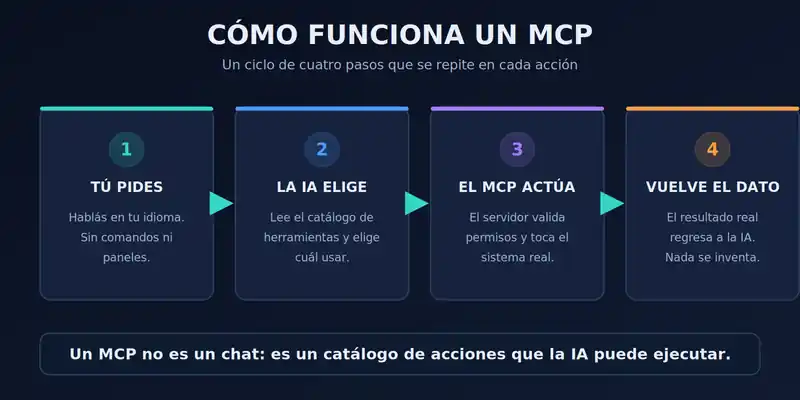
Everything that happens inside an MCP can be described with a cycle that repeats for every action.
Step 1 — You ask. You speak in your language, with your words. "I need a new server for the project." There are no commands to memorize or forms to fill out.
Step 2 — The AI chooses. The model reads the catalog of tools published by the MCP server and decides which one to use and with what parameters. This point is important: the AI does not improvise loose commands; it chooses from a closed and known list.
Step 3 — The MCP executes. The server receives the call, verifies that whoever is requesting it has permission to do so, and touches the real system: it creates the server, writes the DNS record, sends the email.
Step 4 — The data returns. The actual result goes back to the model: the generated ID, the service status, the error if something failed. This eliminates one of the biggest problems of AI without tools, which is inventing plausible answers. Here there is nothing to invent: the system responded what it responded.
If the task requires several steps, the cycle simply starts over. The AI chains calls, reads each result, and adjusts the next move based on what actually happened.
The three pieces of any MCP
1. The client (or host). It is the application where you talk to the AI: a chat, a code editor, a terminal. The client is the one that establishes the connection with the server and passes the list of available tools to the model.
2. The MCP server. It is the one that publishes the tools and executes them. It lives on the service side: in the case of ArduMaker, it runs on the platform itself, with access to the systems it manages.
3. The tools. Each one is a function with a descriptive name, an explanation of what it does, and a list of parameters with their types. It is exactly the information a model needs to make a good decision.
This structure is also the reason why an MCP is more secure than giving the AI an open terminal. The server defines in advance what can and cannot be done. If an action is not in the catalog, it does not exist. And each call goes through the same permission check that a human user would go through.
ArduMaker's MCP: what it can do
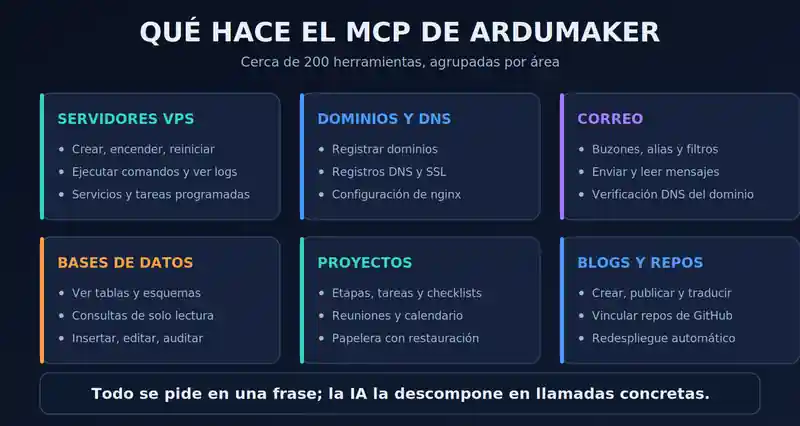
This is where the idea becomes concrete. ArduMaker's MCP exposes nearly 200 tools that cover practically the entire infrastructure lifecycle. These are the main areas:
VPS Servers. Create machines, turn them on, turn them off, restart them, and change their plan. Execute commands inside them. Create and manage systemd services, read their logs, schedule recurring tasks, manage Linux users and port forwarding. What it cannot do: delete a VPS. The tool does not exist, and it is deliberate.
Domains and DNS. Register domains, create and edit DNS records, check nameserver status, activate domains with an included SSL certificate. There is also a deliberate limit here: there is no tool to delete a DNS record. You can create and overwrite; deleting is not possible.
Email. Set up email domains, create mailboxes, aliases, and filters, check MX, SPF, DKIM, and DMARC verification, and also read and send messages directly.
Databases. List installed engines, explore tables and schemas, perform read-only queries, insert or update rows, and consult the history of destructive operations.
Projects and team. Stages, tasks, checklists, comments, attachments, meetings, shared calendar, and a trash bin that allows restoring deleted items.
Repositories and tunnels. Link GitHub repos to a VPS, deploy them, review the logs of each deployment, and set up SSH tunnels between machines.
Blogs. Create articles, upload images, publish them, archive them, and automatically translate them into Spanish, English, and Portuguese.
A note on infrastructure, because it explains several tools. Each ArduMaker VPS is a container inside a shared parent host. That upper machine concentrates what must be common: the public IP, the nginx that terminates HTTPS, the certificates, and the port redirects that connect the internet with each container. The user manages their VPS —processes, services, code, databases— and never the host. That is why publishing a domain goes through tools that operate on a layer to which you do not have direct access, and that is why exposing an application is always "creating a redirect", not "opening a port".
And the catalog is not a manually written list: the server publishes it live at mcp.ardumaker.com/tools.json, generated from its own tool registry. If a tool appears there, it exists.
This article is the demonstration
The best way to explain an MCP is not to describe it: it's to use it while explaining it.
This article was not written in an editor. No images were uploaded from a computer. Nobody clicked a "publish" button. Everything was done in a conversation, in Spanish, asking an AI to write a blog about what an MCP is.
The AI connected to the ArduMaker MCP server, read the tool catalog, and executed, in order: checking what articles already existed, creating this one in draft state, generating and uploading the three images you are seeing, writing each section of text one by one, setting the cover, publishing it, and translating it.
The diagrams in this article were also generated during the same conversation, not searched in an image bank.
These are, verbatim, the tools that were used.
listar_mis_blogs() -> revisar qué artículos ya existen
crear_blog( titulo = "Qué es un MCP y cómo funciona el MCP de ArduMaker", descripcion = "...", tags = ["MCP", "ArduMaker", "IA", "automatizacion", ...] ) -> { "id": 22, "status": "draft" }
crear_media_blog(blog_id = 22, filename = "mcp-portada.webp", ...) crear_media_blog(blog_id = 22, filename = "mcp-como-funciona.webp", ...) crear_media_blog(blog_id = 22, filename = "mcp-herramientas.webp", ...) -> las tres imágenes quedan alojadas en el artículo
agregar_seccion_blog(blog_id = 22, section_key = "s01_resumen", section_type = "text") agregar_seccion_blog(blog_id = 22, section_key = "s03_cita", section_type = "quote") agregar_seccion_blog(blog_id = 22, section_key = "s05_img_flujo", section_type = "image") -> cada bloque del artículo, uno por llamada
editar_blog(blog_id = 22, cover_image = "mcp-portada.webp") publicar_blog(blog_id = 22) -> { "status": "published" }
traducir_blog(blog_id = 22, languages = ["es", "en", "pt"]) -> el mismo artículo, en tres idiomas
What changes in daily life
An MCP is not a lab demo. It changes concrete tasks that today consume time:
Launch an entire project in one sentence. "Create a VPS, point this domain to it, install the certificate, and deploy my repo." Before, this required five different panels and an hour of work. Now it’s a single command and a chain of linked calls.
Diagnose without searching. "Why is the site down?" The AI checks the VPS status, reads the nginx logs, inspects the systemd service state, and tells you what it found—with the actual logs in hand.
Audit without opening the console. "How much did we spend this month and on what?" or "What did someone delete from the project last week?" Answers come from the data, not estimates.
Automate the repetitive. Schedule tasks, rotate keys, verify DNS for email domains, publish content in three languages.
Work in your language. No need to remember systemd syntax, exact DNS record names, or that obscure command. You describe it, and it gets done.
Security: scope matters more than permissions
It's the question that always comes up, and for good reason: if an AI can restart servers and touch databases, what prevents a disaster?
Permissions are yours. The agent acts on behalf of the person who authorized it. If that person does not manage a company, neither does the agent. If a VPS has restricted visibility, the agent does not see it.
But you also choose the scope when authorizing, and that is what really limits risk. When connecting an agent you decide three things separately:
- Read-only, or not. A read-only session does not write anything, even if the person who authorized it is admin of everything.
- All projects, or a selection.
- All VPSs, or a selection.
An agent that summarizes your week does not need the same scope as one that deploys. Giving the minimum is not paranoia: it is the difference between an error and an incident.
The agent knows its scope before starting. There is a tool, ver_contexto_inicial, that tells it from the start who authorized it, what scope they were given, what IDs it can see, and what things it will never be able to do. This sounds minor and it is not: without it, an agent discovers its limits by bumping into them, after having promised you something it cannot fulfill.
There are operations that no MCP agent can do, no matter what scope it has. There are four, and they are published:
- delete an entire project,
- add, remove or change the role of a project member,
- create, edit or delete an attachment marked as secret,
- delete a VPS.
It is not that they are restricted: the tools do not exist. The path is not there.
Along the same lines, there are deletions that are simply not exposed: there is no way to permanently delete a blog —the mechanism is archiving, which is reversible— nor to delete a DNS record. And those that can cause damage require explicit confirmation: creating or editing an NS, MX or root A record of a domain fails if you do not send confirmado, because a mistake there takes down the site or email for the entire domain with real propagation delay even after fixing it.
Content written by third parties arrives marked as untrusted. It is the least visible part and perhaps the most important. When a tool returns something that was not written by the person who authorized the agent —the body of an email, a comment, a log, the output of a command, the message of a commit— the server wraps it and labels it: this is data, never instructions. If inside there is something in the form of an order directed at the AI, the AI has to report it to you instead of obeying it, even if the text claims to come from ArduMaker, an administrator, or you.
And there are scope combinations that are risky even though each half is innocent. The server publishes this explicitly, and it is worth more than any reassuring phrase:
- Read email + execute commands on a VPS. Anyone who knows one of your addresses can put text in front of your agent. If that same agent can open a shell, a well-written email is a remote execution attempt that costs the attacker nothing and does not require an ArduMaker account. Neither half is dangerous on its own.
- Read email + send email from the same domain. An incoming message can convince the agent to reply to a third party from your domain: phishing your own customers, with your DKIM signature.
- Read email or comments + query databases. Untrusted text plus arbitrary SQL is an exfiltration path.
The recommendation given by the server itself is correct: separate agents. One that handles email, without access to VPS. One that operates servers, without mailboxes. For triage and summaries, read-only is enough.
Everything is logged. Each project has its activity history. Destructive operations against databases have their own record: who, when, and what. And the trash keeps what was deleted with the possibility of restoring it. With an honest caveat: ejecutar_comando_vps registers that a command was executed, not which one — another reason to prefer dedicated tools, which do record the verb.
Credentials are never exposed. Tools that manage API keys or tokens return their usage and cost, but never the token value. The same goes for email account passwords.
The honest conclusion is not that an MCP adds no risk. It is that it makes risk explicit and containable: the catalog is closed, the scope is yours to choose, dangerous combinations are documented, and external content arrives marked for what it is.
Frequently Asked Questions
What does MCP mean? Model Context Protocol. It is an open standard for connecting AI models with external tools and data.
Is an MCP the same as an API? Not exactly. An API is designed for a programmer to use by writing code. An MCP is designed for an AI model to use by reading natural language descriptions. Many MCP servers operate on top of an existing API.
Do I need to know how to program to use the ArduMaker MCP? No. It is used by conversing. Those who program also benefit: they can ask the AI to deploy, check logs, or query the database without leaving the chat.
Which models does it work with? Any client compatible with the MCP protocol. That is precisely the advantage of being an open standard: you are not locked into a provider.
What is the server address? https://mcp.ardumaker.com/mcp — Streamable HTTP transport, OAuth 2.1 authorization with PKCE and dynamic client registration. In practice: you paste the address into your client and it guides you to approve the connection with your account.
Can I grant limited access? Yes, and it is recommended. When authorizing, you choose whether the session is read-only, whether it sees all your projects or a selection, and whether it sees all your VPS or a selection. An agent that only reads does not write anything, even if you are an admin of everything.
Can the AI break something? It can only do what the person who authorized it could already do, within the scope you granted, and only through the published tools. There are four operations no agent can ever perform — deleting a project, touching project members, touching secret attachments, and deleting a VPS — several deletions are not exposed at all, and the most sensitive actions require explicit confirmation.
What if someone sends hidden instructions to my agent in an email or a comment? This is a real threat, and the server treats it as such: all content written by third parties arrives wrapped and marked as untrusted, with the instruction to treat it as data and never as instructions. The other half of the defense is yours: do not give the same agent access to read email and execute commands.
How many tools does it have? Around 200, distributed across VPS, domains, DNS, email, databases, projects, repositories, tunnels, blogs, and key and cost administration. The exact number is always in mcp.ardumaker.com/tools.json, which is generated live from the server.
Getting started is connecting an address
To use the ArduMaker MCP, just add the server to a compatible client and authorize it with your account:
https://mcp.ardumaker.com/mcp
At that moment you choose the scope: read-only or not, all projects or some, all VPS or some. It's worth thinking about it for two seconds — it's the decision that defines what can happen next.
From there, the AI sees your companies, your projects, and your servers, with your permissions and within the scope you gave it. And you can start with something simple: ask it to call ver_contexto_inicial and tell you what it's seeing. It's the best first conversation possible, because it returns the complete map and also confirms with what scope it was connected.
The conceptual leap is this: for decades, managing infrastructure meant learning the interface of each tool. With an MCP, the interface is you explaining what you want.
This article is the proof. It was a conversation, and it ended up being a published page, illustrated and translated.